Renegade Games
You can also contact xbox support. Click to go to xbox suport.
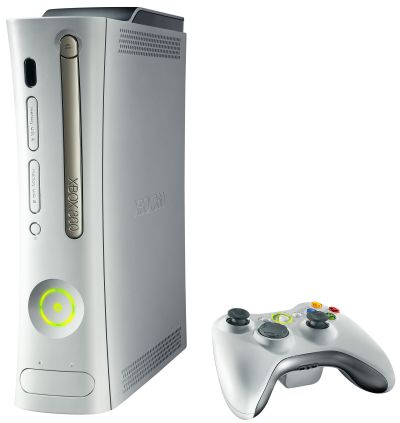
Do you have flashing red lights on your Xbox 360?
Do you have flashing red lights on your Xbox 360 console? If so, you're in the right place.
Let's get started! How many lights flash red on your console?

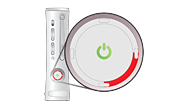
One Red Light
Do you have an error message? If you don't, your television screen or monitor may be blank.
Error Coder E74
The fastest way to get your console back in working order is if the console continues to flash a red light, the console will need repair by Microsoft.
- How long will it take? The average time to repair a console for customers in the United States and Canada is between 14 and 21 days.
- What's the cost? That depends on whether or not your console is in warranty. If you purchased your console less than a year ago, the repair is FREE. If it is not in warranty, you will be able to see the cost of the repair before you submit it.
Disconnect your power supply cords
If your power supply cords are not plugged in securely, you may see one flashing red light when you turn on your Xbox 360 console.
- Turn off your console.
- Disconnect the power cord from the back of your console. Unplug the power cord from the wall outlet and the power supply unit.
- Reconnect all three connections making sure they are secure.
- Turn your console back on.
- If this solution worked, your power button should look like the normal green ring.
On occasion, one flashing red light is caused by a faulty Xbox Memory Unit (MU). You can determine if the MU is the problem with a few easy steps.
- Turn off your Xbox 360 console.
- Disconnect the memory unit.
- Turn your console back on.
- If this solution worked, your power button should look like the normal green ring.
One light will flash red if you have a defective accessory connected to your console. You can determine if the problem is caused by an Xbox 360 accessory with a few easy steps.
- Turn off your Xbox 360 console.
- Disconnect any accessories, such as a controller or the Wireless Network Adapter.
- Note Only the AV cables and the power supply unit (PSU) should be plugged into your console.
- Turn your console back on.
- If this doesn't work.
- Turn your console off.
- Try removing your hard drive.
- Then turn your console back on with out the hard drive.
- If this solution worked, your power button should look like the normal green ring.
The next step is to download the latest update for your console.
At www. support.xbox.com fallow there easy steps.
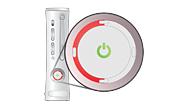
Two Red Lights
Two flashing red lights can occur if your console is not cooling down properly.
That's right. Your Xbox 360 console might be too hot.
If your Xbox 360 console is already in a clean and well-ventilated area but is still flashing two red lights, follow these steps to let your console cool down.
- Turn off your console.
- Wait for the console to cool.
- Note It may take several hours for your console to cool.
- Turn your console back on.
- If you still have a problem.
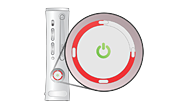
Three red lights
Check your power supply light
Three flashing lights may indicate that your power supply or Xbox 360 console is experiencing a hardware failure.
If your power supply is green, red, orange or even not lit at all.
- Turn off your console.
- Disconnect the power cord from the back of your console. Unplug the power cord from the wall outlet and the power supply unit.
- Reconnect all three connections making sure they are secure.
- Turn your console back on.
- If this solution worked, your power button should look like the normal green ring.
If you still have a problem.
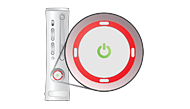
Four red lights
Disconnect your AV cable
If your Xbox 360 console has four flashing red lights, you may have a problem with your AV cable. The AV cable connects your console to your television. A faulty connection or cable can interrupt your experience.
- Turn your console and your television off.
- Disconnect the cable from the AV port on your console.
- Unplug the AV connectors to your television.
- Reconnect the cable to the AV port on your console. Note The AV cable will meet some resistance before it is completely connected. Make sure that the cable is fully inserted
- .Plug in the AV connectors to your television. The AV connectors match the colors of the component video, the composite video, and audio ports on your television.
- Turn your television and your console back on.
If you still have problems.
You can also contact xbox support. Click to go to xbox suport.
